Over the 2023 holidays, I wanted to learn more about GeoParquet and learn more about geospatial data in general. I decided to create a simple Neo4j plugin that reads in a Geoparquet file (or any parquet file for that matter) and return the results to the user. This is similar to the capability in the APOC-Extended library although my plugin adds the GeoParquet capability. The idea is to take that data and pass it to the Neo4j H3 plugin for additional processing.
The initial code base is here. Let’s look at some examples on how this works. First we will use a GeoParquet file of the US Counties.
Our code block looks like this:
call com.neo4jparquet.readParquetWKT("/var/lib/neo4j/import/county.parquet") yield value
return value limit 2;
and the result looks like this:
In this case we use the com.neo4jparquet.readParquetWKT to get the geometry in a WKT format. You can see the key value pairs that are returned.
If we choose to return the Polygon as a list, we can pass it into an H3 procedure to return the number of H3 rings at resolution 10.
call com.neo4jparquet.readParquet("/var/lib/neo4j/import/county.parquet") yield value
with value where value.STATE_NAME = 'South Dakota'
    AND value.NAMELSAD = 'Charles Mix County'
call com.neo4jh3.polygonToCells(value.Geometry,[],10,'lonlat') yield value as h3
return count(h3)
Geospatial use cases with Neo4j are interesting. A colleague recently asked if there was a way to identify which pieces of property a power line might intersect. Thinking back to previous work on H3 and Neo4j, I knew we could model the power line as a set of hex addresses and model the property geometry as a set of hex addresses.
First we needed to find some data. Fortunately, there is a dataset of US Electric Power Transmission Lines from ESRI. I also was able to use a dataset of US County data that I had previously accessed.
The Power Transmission Line data was in JSON format but the GeoJson information was in a MultiLineString. A couple of months ago, I thought I had the conversion from MultiLineString to H3 done in my Neo4j H3 plugin, but alas, I had messed it up royally. However, a great StackOverflow post with insight from Nick Rabinowitz got me headed in the right direction.
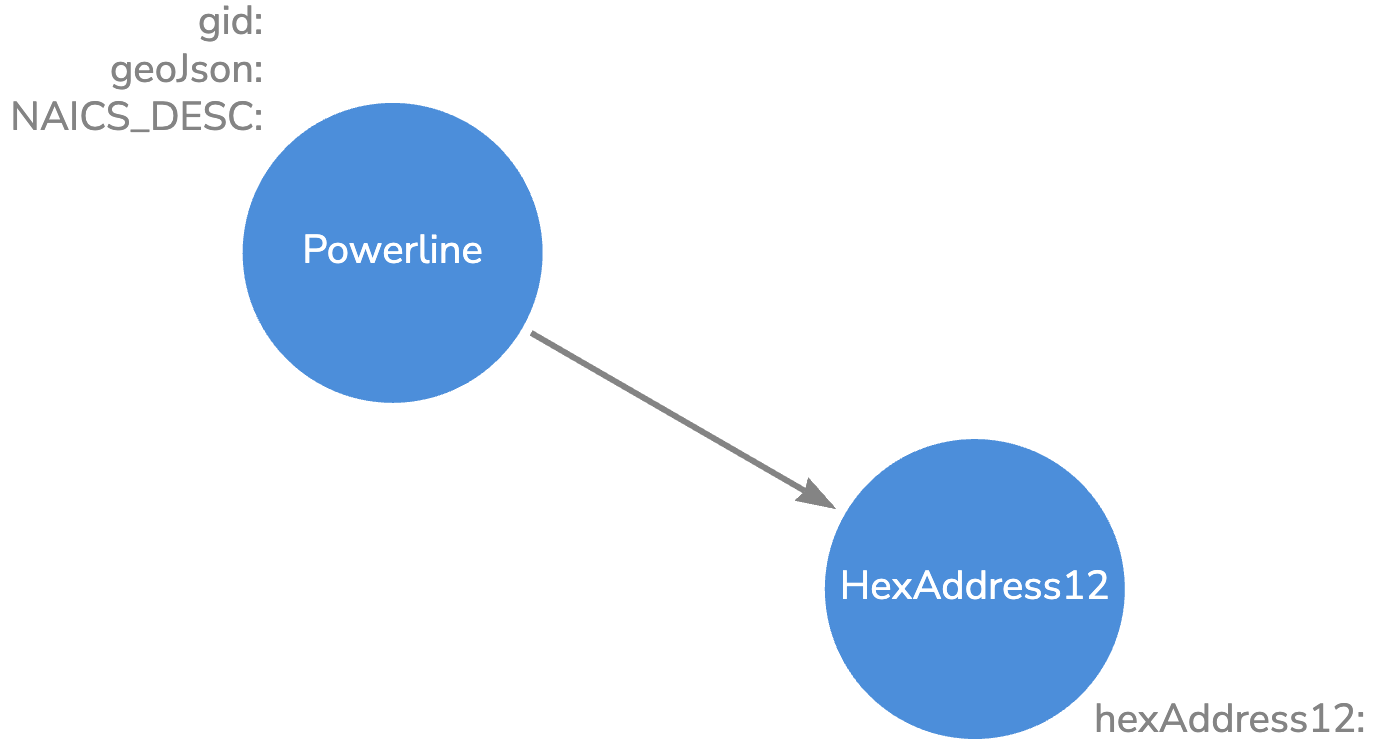
Basically, I took each pair of lat/lon and found their midpoint. Then I found the list of H3 addresses at resolution 12 along that line using the H3 GridPathCells feature. Each resulting H3 address was linked to the Power Transmission Line. Our Neo4j model. looks like this:
We have 93,000 Powerline nodes and 50.7M HexAddress12 nodes.
Our State -> County -> Hex Address 10 Knowledge Graph looks like this:
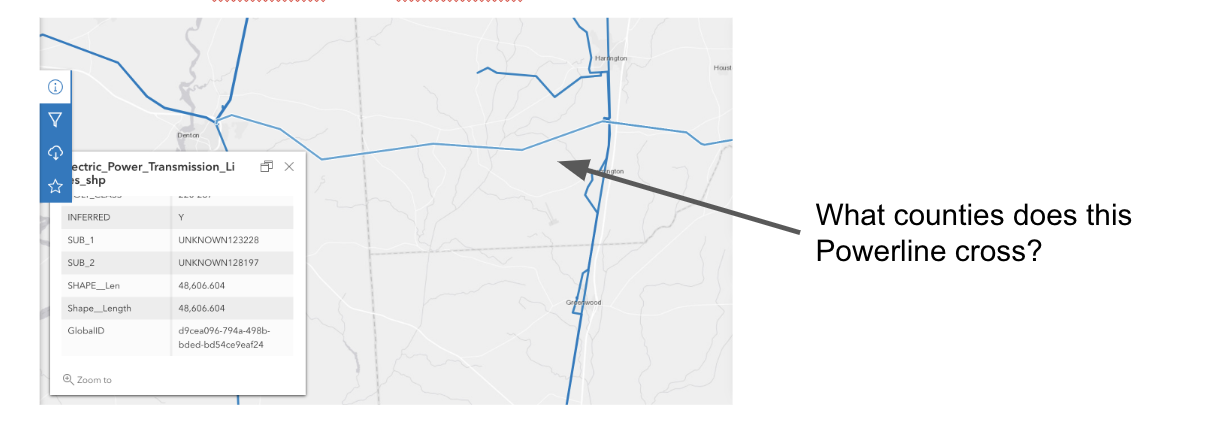
So now that we have the data in Neo4j, let’s ask some questions:
In order to answer that question, we run the following query:
CALL {
    USE geodemo.powerlines
    match (p:Powerline)-[:CONTAINS_HEXADDRESS12]->(h12)
    where p.gid = '{D9CEA096-794A-498B-BDED-BD54CE9EAF24}'
    WITH distinct (com.neo4jh3.toparent(h12.hexAddress12,10)) as h10
    return collect(h10) as cha10
}
CALL {
    USE geodemo.geokb
    with cha10
    MATCH (h10:HexAddress10)<-[:CONTAINS_HEXADDRESS10]-(c:County)
    where h10.hexAddress10 IN cha10
    return c
}
return c;
Our query returns the 3 counties that the Power line crosses.
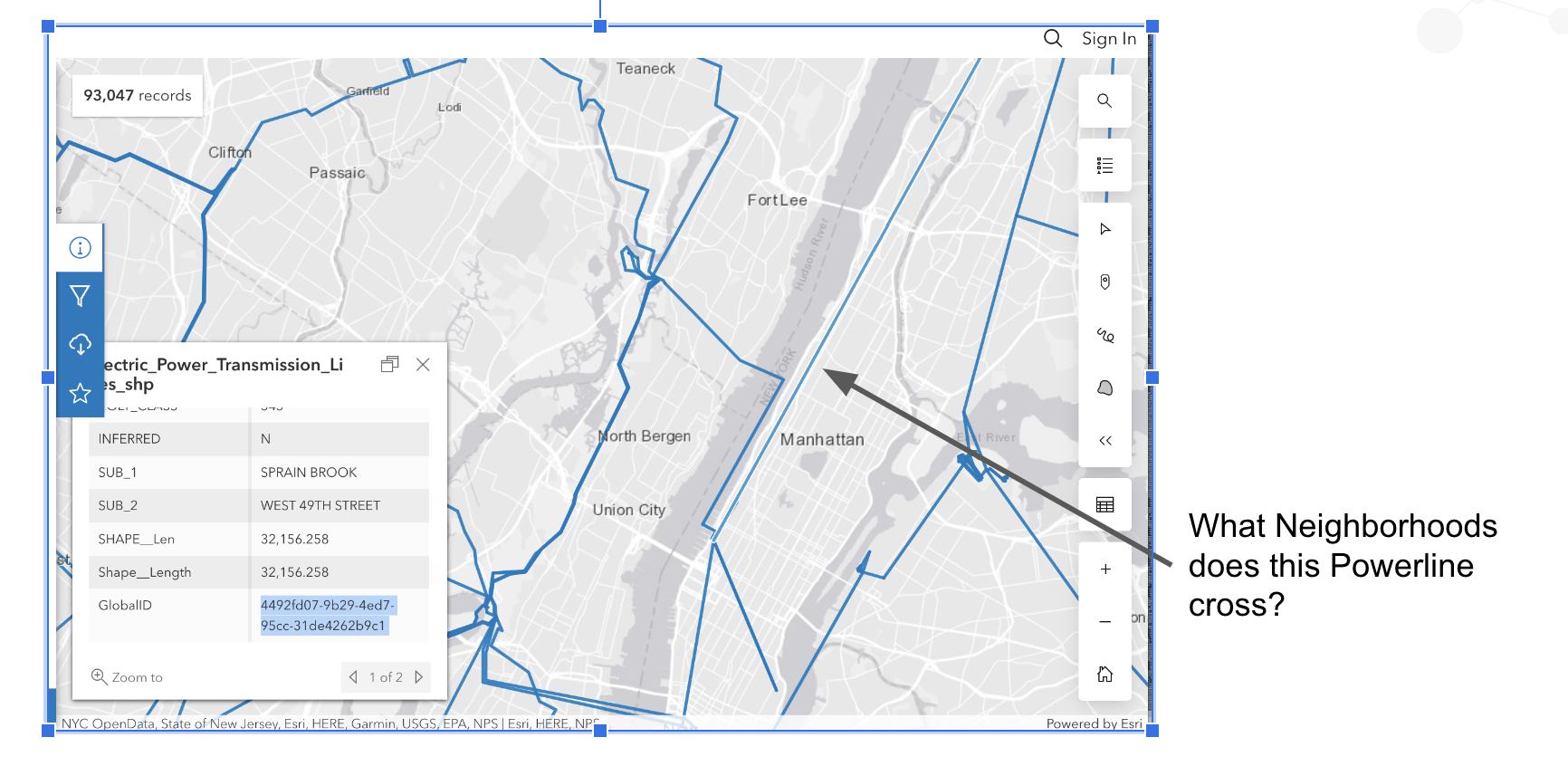
Let’s ask one more question. This time let’s look at NYC and see if we can figure out which neighborhoods are impacted by a Power line.
Again, let’s write a Cypher query to figure this out.
CALL {
    USE geodemo.powerlines
    match (p:Powerline)-[:CONTAINS_HEXADDRESS12]->(h12)
    where p.gid = '{4492FD07-9B29-4ED7-95CC-31DE4262B9C1}'
    WITH distinct (com.neo4jh3.toparent(h12.hexAddress12,10)) as h10
    return collect(h10) as cha10
}
CALL {
    USE geodemo.geokb
    with cha10
    MATCH (h10:HexAddress10)<-[:CONTAINS_HEXADDRESS10]-(n:Neighborhood)
    where h10.hexAddress10 IN cha10
    return distinct n
}
return n;
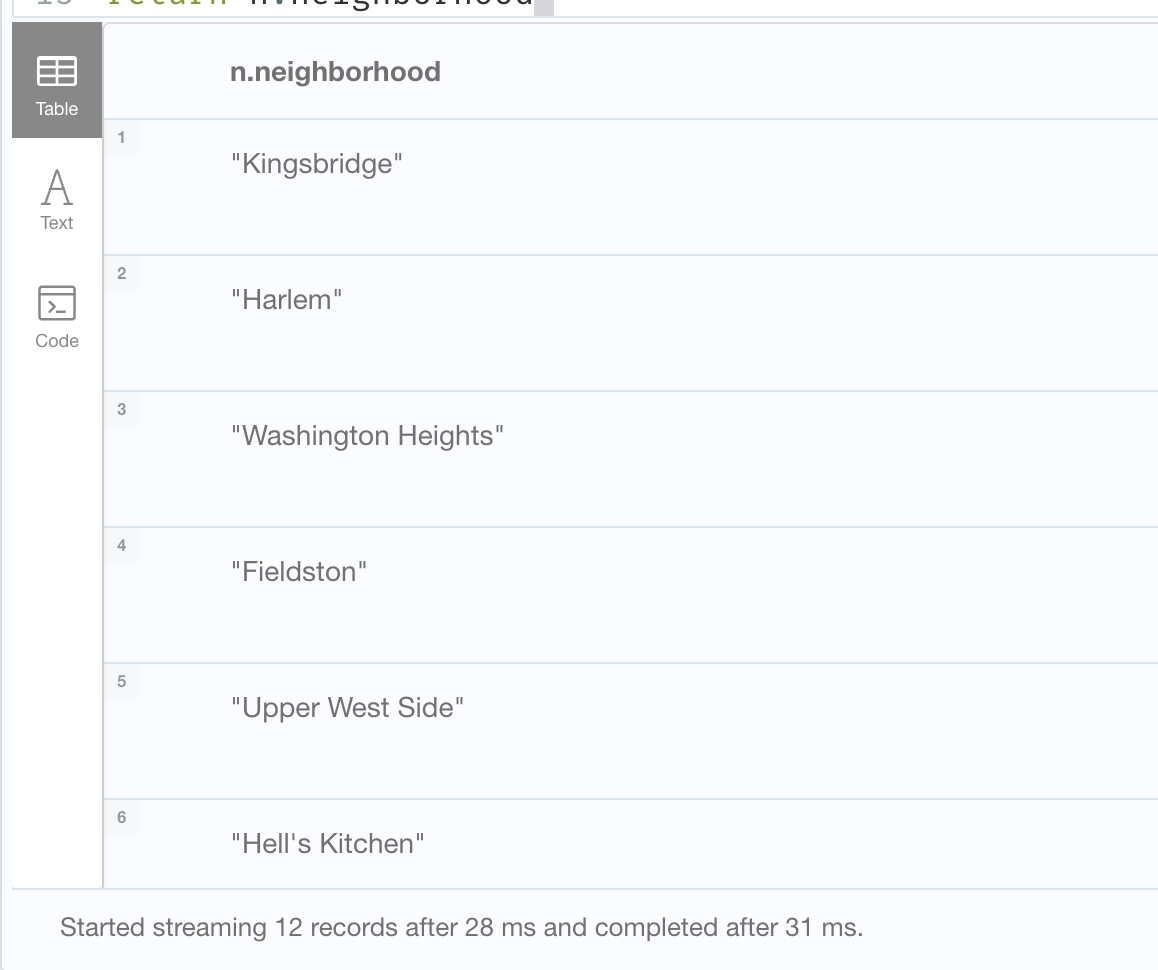
In 31ms, we get the 12 neighborhoods that the Power Transmission Line crosses.
These are just a couple of ways that we can use Neo4j, H3 and geospatial queries to answer questions.
Recently we noticed some customers having these types of warning messages in their debug.log file:
WARN  [o.n.i.p.PageCache] Reflection access to java.nio.DirectByteBuffer is not available, using fallback mode. This could have negative impact on performance and memory usage. Consider adding --add-opens=java.base/java.nio=ALL-UNNAMED to VM options.

WARN  [o.n.k.i.t.l.f.LogFileChannelNativeAccessor] [neo4j/93245d0a] Unable to evict transaction log from cache with version: xxxx. Error: ErrorCode=-1, errorMessage='Incorrect file descriptor.'

WARN  [o.n.k.i.t.l.f.LogFileChannelNativeAccessor] [neo4j/93245d0a] Error on attempt to preallocate log file version: xxx. Error: ErrorCode=-1, errorMessage='Incorrect file descriptor.'
These warnings occur if these additional jvm settings are missing from the neo4j.conf.
This would impair the ability of the JVM to manage memory when it became contentious and as a result you see errors begin to appear in the logs and potentially a degradation in overall performance as the JVM begins to operate sub-optimally.
If you are using a Docker deployment, check to make sure you are properly including the additional JVM settings. For a docker deployment: “Variables that can take multiple options, such as NEO4J_server_jvm_additional, must be defined just once, and include a concatenation of the multiple values.”
If you are deploying in other ways, check the neo4j.conf to make sure those lines are in the configuration.
In this blog post, we are going to run through some simple queries to show how to query and traverse the graph. We are going to focus on the geospatial database for now. The next blog post will discuss using the Neo4j 5 Composite Database for the distributed queries.
Data Model
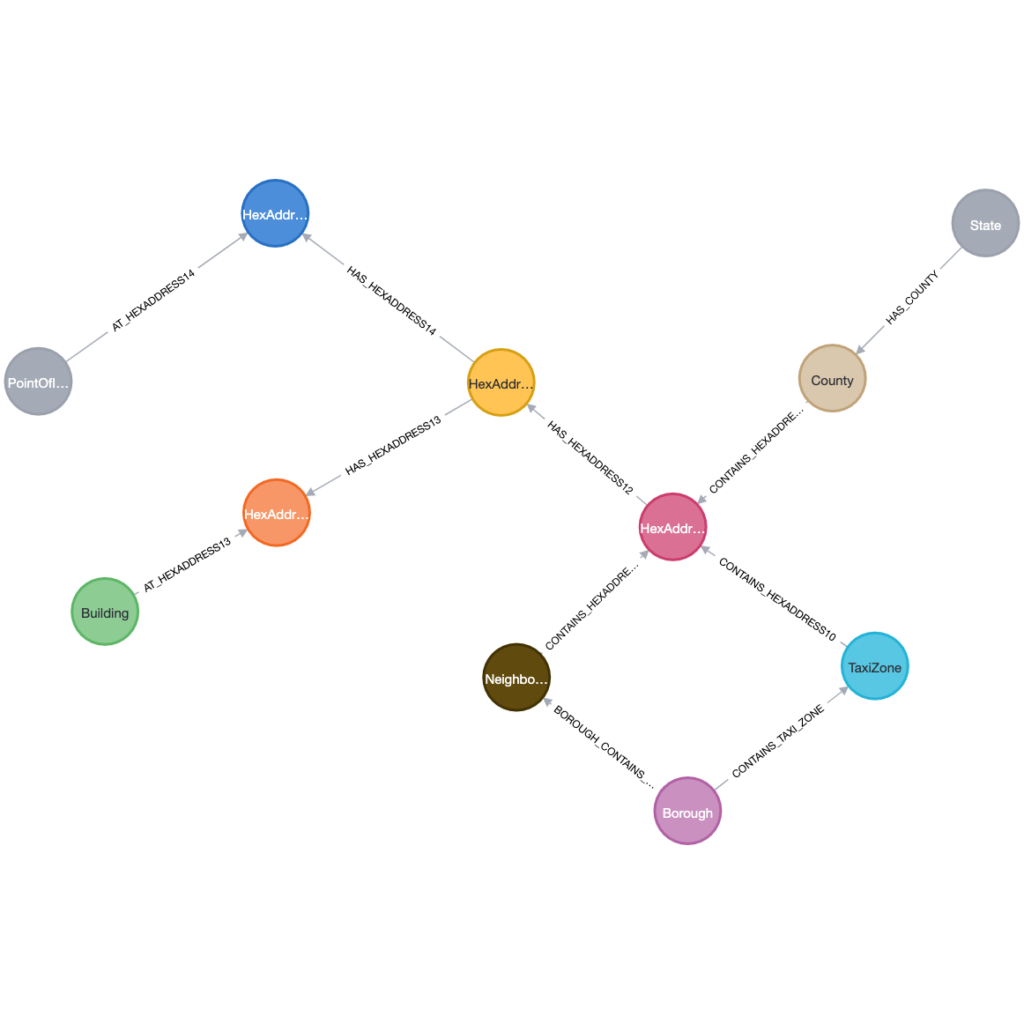
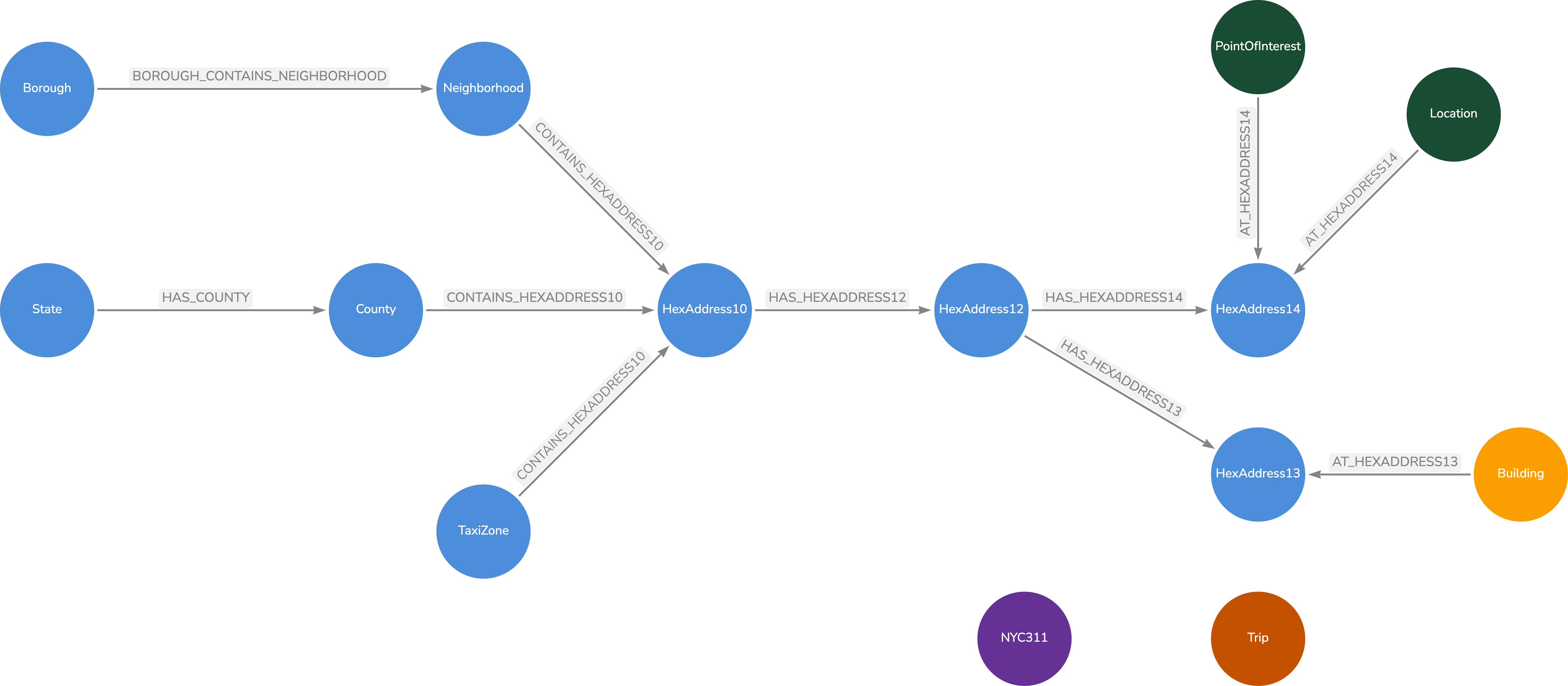
As a quick refresher on the data model, we have it below. We have some geospatial objects (Borough, Neighborhood, TaxiZone, Building, County and Point of Interest). Each object is connected to a HexAddress or a set of HexAddresses.
Geospatial Data Model
For our queries, we will run a few sample queries using Cypher as well as using the H3 plugin. Those queries will be:
Given a latitude and longitude, find the Neighborhood and Borough
Given a TaxiZone, how many buildings are in that TaxiZone
What buildings are nearest a Point of Interest
Queries
Let’s get started.
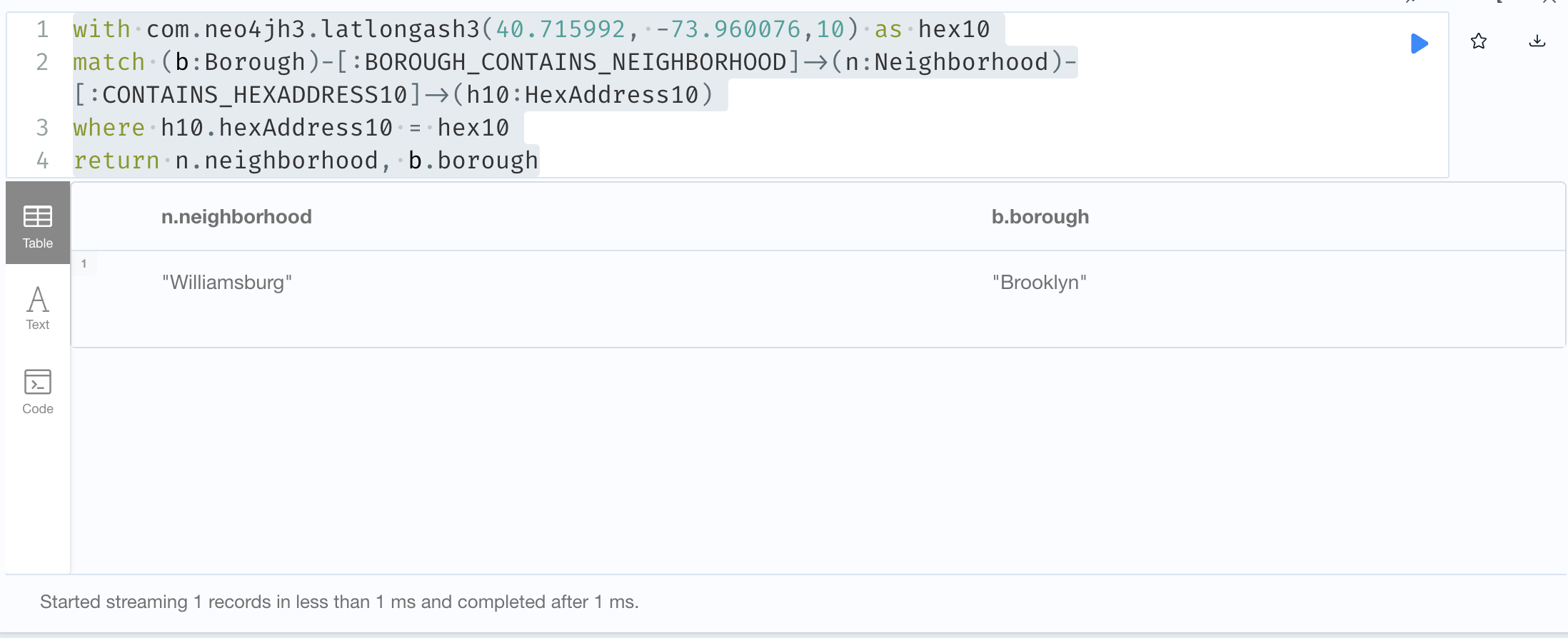
// Neighborhood and Borough for a latitude / longitude)
with com.neo4jh3.latlongash3(40.715992, -73.960076,10) as hex10
match (b:Borough)-[:BOROUGH_CONTAINS_NEIGHBORHOOD]->(n:Neighborhood)-[:CONTAINS_HEXADDRESS10]->(h10:HexAddress10)
where h10.hexAddress10 = hex10
return n.neighborhood, b.borough
In this query, we use the com.neo4jh3.latlongash3 function to convert our location to a hex10 address. We then find the Neighborhood that contains that address and traverse from the Neighborhood to the Borough. The result is;
Query results.
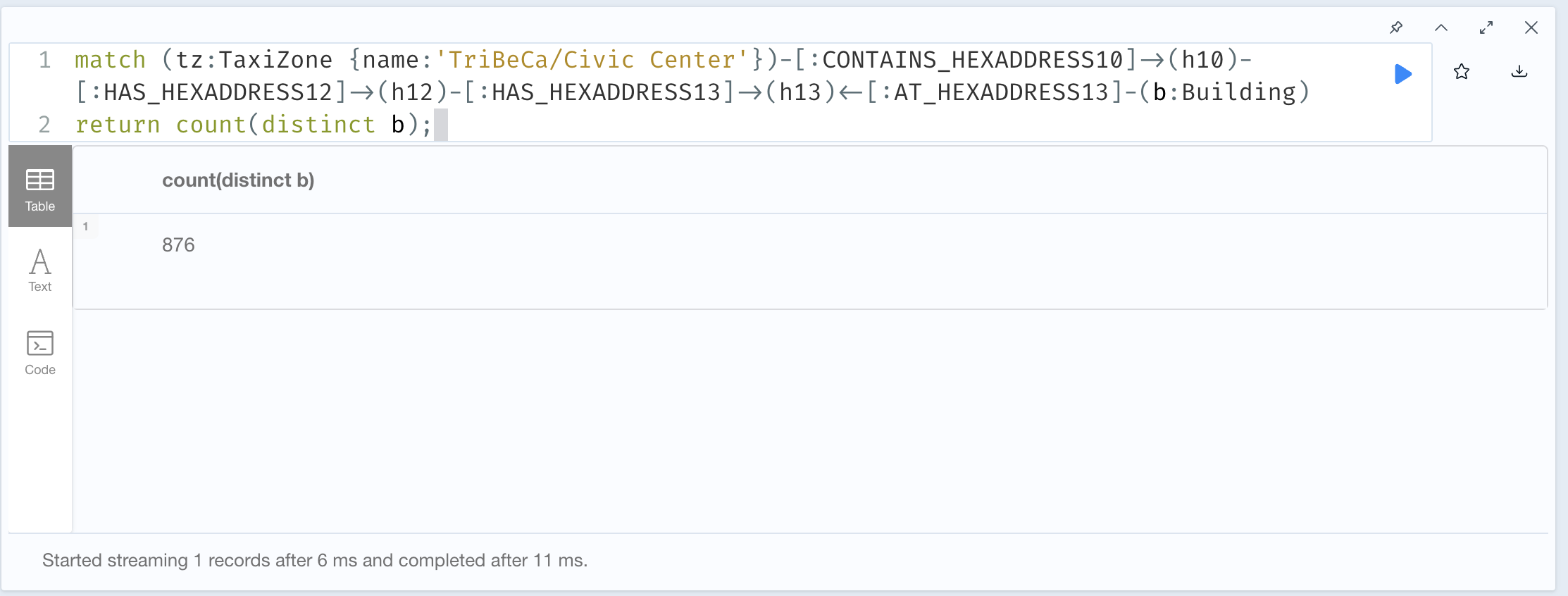
For the next query, we will pick a TaxiZone and traverse the graph to count the number of buildings within the TaxiZone area.
// Buildings within a TaxiZone
match (tz:TaxiZone {name:'TriBeCa/Civic Center'})-[:CONTAINS_HEXADDRESS10]->(h10)-[:HAS_HEXADDRESS12]->(h12)-[:HAS_HEXADDRESS13]->(h13)<-[:AT_HEXADDRESS13]-(b:Building)
return count(distinct b);
Query Results
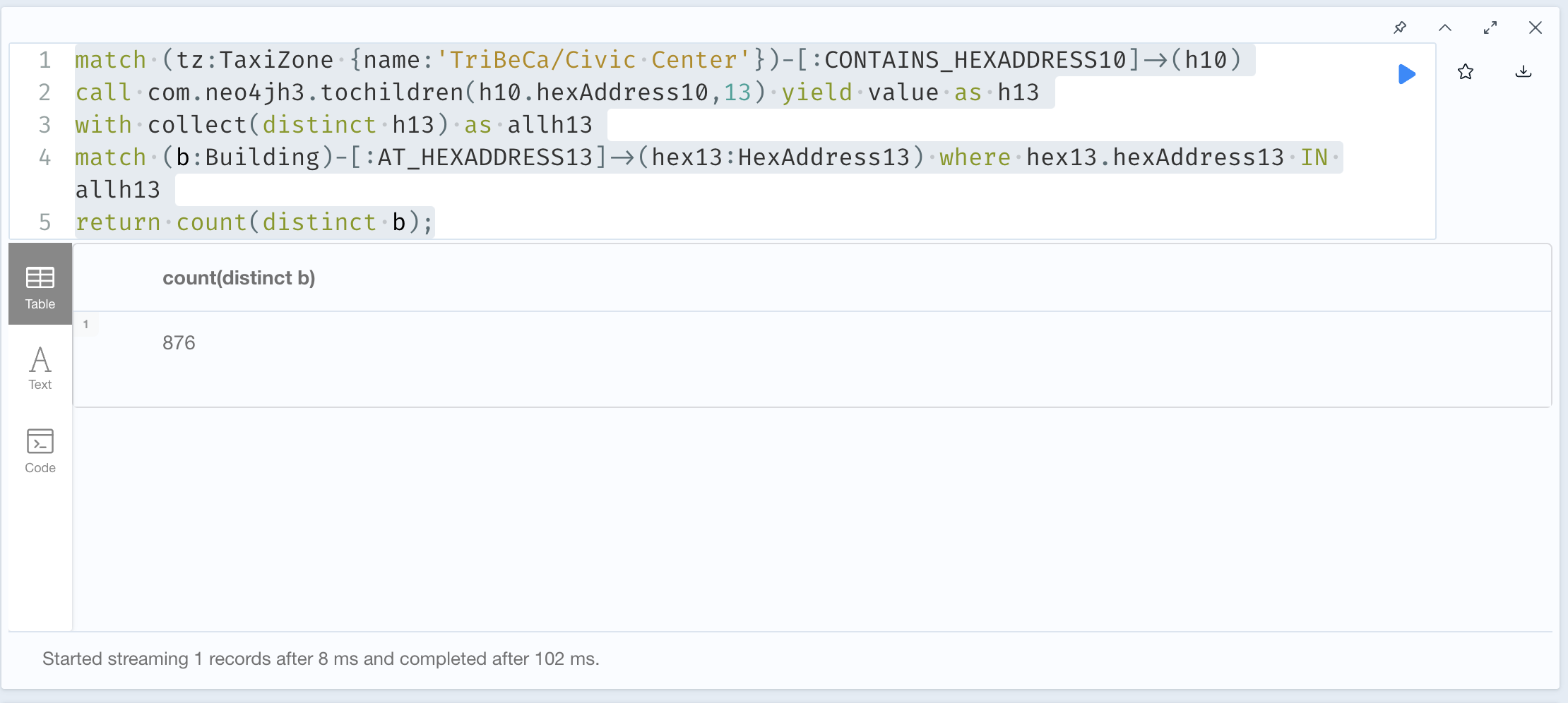
We can also use the com.neo4jh3.tochildren(h10.hexAddress10,13) procedure to calculate all of the children H3 addresses at resolution 13 and then query the buildings that would be in that collection of addresses. The query looks like this:
match (tz:TaxiZone {name:'TriBeCa/Civic Center'})-[:CONTAINS_HEXADDRESS10]->(h10)
call com.neo4jh3.tochildren(h10.hexAddress10,13) yield value as h13
with collect(distinct h13) as allh13
match (b:Building)-[:AT_HEXADDRESS13]->(hex13:HexAddress13) where hex13.hexAddress13 IN allh13
return count(distinct b);
This runs a little bit slower than the previous example but still gives the same results.
Query Results
Finally, let’s see what buildings might be near a Point of Interest. We use the com.neo4jh3.toparent function to get the Point of Interest Hex address at resolution 13. Then we use the com.neo4jh3.gridDisk procedure to expand our search radius. Finally, we use the Neo4j point.distance calculation to return the distance in kilometers between the point of interest and the buildings.
match (p:PointOfInterest {name:'Little Chef Little Café'})-[:AT_HEXADDRESS14]->(ha:HexAddress14)
with p,ha
with p, com.neo4jh3.toparent(ha.hexAddress14,13) as h13
call com.neo4jh3.gridDisk(h13,10) yield value as h13rings
with p, collect(h13rings) as h13set
match (b:Building)-[:AT_HEXADDRESS13]->(bh13:HexAddress13)
where bh13.hexAddress13 in h13set
return p.name, b.bin, point.distance(point({latitude:p.latitude, longitude:p.longitude}),point({latitude:b.latitude, longitude:b.longitude}))/1000 as distance
order by distance asc;
Query Results
Wrap-Up
We have walked through using our Geospatial Graph to identify objects within another polygon (i.e. Borough) or near one another without doing complex geospatial joins. You may be thinking where are the trips or the NYC311 calls or even the NPI providers. Rather than add all of that data into this graph, we are going to have separate graphs for each data set and use the composite database feature to query them. Stay tuned for that upcoming post.
Here is the definition from the Neo4j white paper “A knowledge graph is an interconnected dataset enriched with semantics so we can reason about the underlying data and use it confidently for complex decision-making”.
Connecting data adds context and improves outcomes. Connecting data makes that data inherently more valuable and provides dynamic context. Knowledge graphs provide deep, dynamic context. They enable people to find all related information in one place, with all of the relationships across that data.
We are going to create a database of publicly available geospatial data and create a graph that we can use as a reference point. The geospatial reference data consists of Taxi Zones, Counties, Neighborhoods and Buildings. These items rarely update or move so we are going to create our knowledge graph from that data. We will then add in other data sets (NPI data, NYC 311 calls and NYC Taxi pickups) into other databases. Using the H3 hex addresses, we can easily join across the data sets where the geospatial knowledge graph is our source of reference locations.
H3 Addressing and Resolutions
H3 is a geospatial indexing system that partitions the world into hexagonal cells. With H3, we can assign or relate a geographic location to a series of H3 addresses. Once we have the H3 address, we can locate other things (building, road, store) within or near the H3 address or we can identify events that happened nearby. H3 allows us to easily deal with large volumes of data.
A question that we should answer is “do I need to create a node for every possible hex address?”. If we did create a node and the necessary relationships for every possible hex address, we would have millions to billions of nodes and relationships. Most of those would not be used and would take up space in the database.
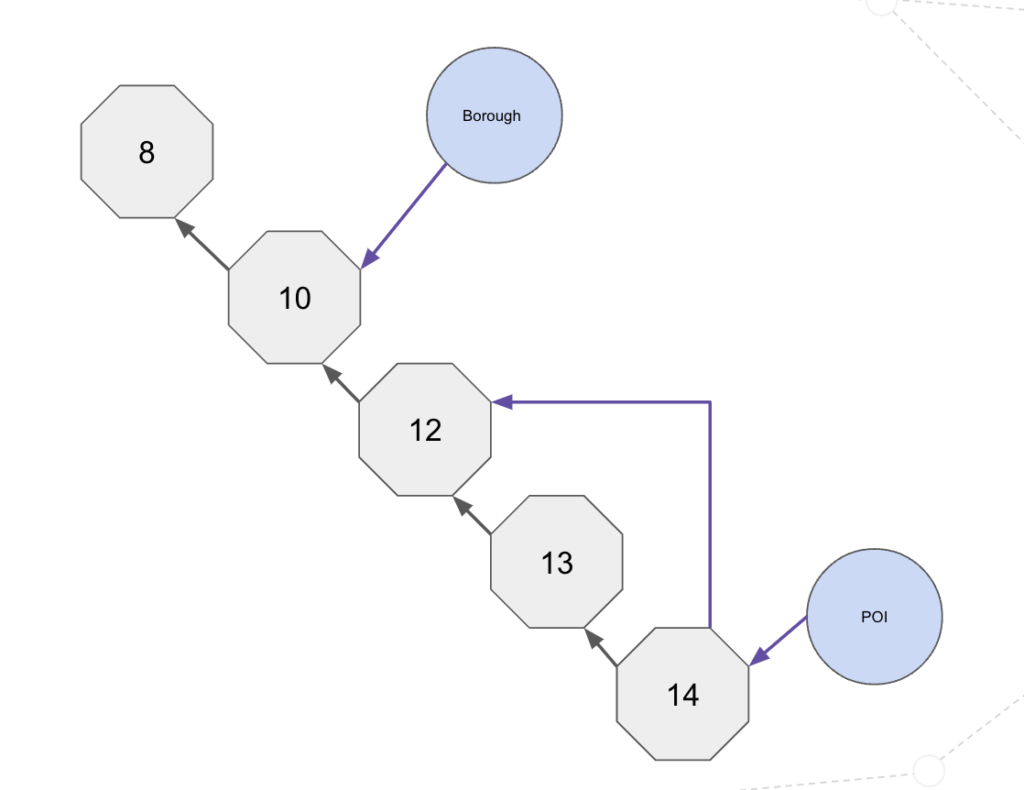
Instead, we are going to find the Resolution 14 nodes in our geospatial graph and connect them to their Resolution 13 parent. For each of the Resolution 13 nodes, we connect them to their Resolution 12 parent. We sill go from Resolution 12 to Resolution 10 and from Resolution 10 to Resolution 8. We can use the H3 toParent function and the H3 toChildren function to get the parent node at a desired resolution or all children nodes at a desired resolution. For example, we can find a Neighborhood, collect all resolution 10 addresses, find their children at resolution 14 and use that set of values to find all of the NYC 311 calls in that neighborhood.
Our Neo4j Model
Our Neo4j Geospatial Graph data model looks like the following:
Neo4j Geospatial Graph Model
Wrap-Up
We’ve discussed why we would want to build a geospatial graph database and how we would go about it with the H3 Hexagonal hierarchical geospatial indexing system. We talked about approaches dealing with the H3 resolutions as well.
Now that we have our logical model, the next post will be a short overview of loading the data.
The NYC Taxi Data set covers four years of taxi operations in New York City and includes 697,622,444 trips. Each trip record contains a pickup location, pickup date and time, dropoff location and dropoff date and time. There are some other fields in the dataset but these are the fields of interest. In the last couple of years, the NYC Taxi Data set has changed so the pickup and dropoff locations are Taxi Zones and not actual latitude/longitude locations. We are using a dataset that still had the latitude/longitude values for the dropoff and pickup points.
The Taxi Zones, Counties and Boroughs contain the GeoJson representation for each polygon / Multipolygon.
H3 Hierarchy
H3 is a hierarchical geospatial index. As such, it contains a resolution hierarchy from 0-15 with 0 being the largest resolution and coverage area and 15 being the smallest resolution.
We will need to think through how to translate the Trip data and the polygons to an appropriate resolution to make sure we accurately locate the trip details as well as for the polygons. Some of this will be trial and error and some will be looking at what others have done to see what makes sense.
Databricks chose a resolution of 15 for the trip data. For our testing, we will use a resolution of 14. For the Taxi Zones, Counties and Boroughs, we are going to start with a resolution of 10. This should give a good balance between the accuracy of the hexes within the polygon and the number of hexes per geometry.
Modeling the Hierarchy
For our initial approach, we are going to model the H3 hierarchy by going from Resolution 14 -> Resolution 12 -> Resolution 10. We are going to skip Resolution 13 and Resolution 11 for now. It may change after we run some experiments but for now we think this will work fine for the queries that we are running.
Initial Neo4j Data Model
My first go at the data model looks like the following:
NYC Taxi Data Model
In the model, I calculated the HexAddress at resolution 10 for the Neighborhood, County (NY State only) and the TaxiZones. For each HexAddress at resolution 10, we found the corresponding HexAddress12 values. For each HexAddress12, we found the corresponding HexAddress14 values. Points of Interest latitude/longitude were converted to a HexAddress14 value and linked to the appropriate HexAddress14 node.
Trips, NYC311 are by themselves for now. The trips have a HexAddress14 property for the dropoff and the pickoff latitude/longitudes. We will index those properties and just look up the values to identify the trips within a neighborhood, taxi zone or county.
If you have sparse points of interest or some sparse data, an approach to minimize the number of HexAddress nodes would be to index the nodes at the smallest resolution (i.e. 14). For each of those resolutions, find their parent at resolution 12 and create a node/relationship. Find the parent at resolution 10 for each resolution 12 node. This way there are only the hex addresses that would actually be connected to data.
For example, in my home state of South Dakota, there may not be a lot of Points of Interest. I would not want to create hex addresses for counties where there are no Points of Interest associated with them.
Thanks for reading this far. Next time we will talk a little more in depth about building the geospatial knowledge graph.
After about four years (where did that time go?), I have circled back to Neo4j and H3 geospatial data processing.
Since version 3.4, Neo4j has a native geospatial datatype. Neo4j uses the WGS-84 and WGS-84 3D coordinate reference system. Within Neo4j, we can index these point properties and query using our distance function or you query within a bounding box.
In the next few posts, we’ll discuss the new plugin and walk through some examples of how to use the plugin within Neo4j for geospatial usecases.
What is H3
From the H3Geo.org website, “H3 is a geospatial indexing system that partitions the world into hexagonal cells. H3 is open source under the Apache 2 license.
The H3 Core Library implements the H3 grid system. It includes functions for converting from latitude and longitude coordinates to the containing H3 cell, finding the center of H3 cells, finding the boundary geometry of H3 cells, finding neighbors of H3 cells, and more.”
Why H3
H3 leverages the power of hexagons to create a global grid system with 16 resolutions, from 0 (the size of a small continent) to 15 (less than a square meter). While the H3 library itself doesn’t perform geospatial analysis, it provides the core building blocks for a range of analytical functions. One of the most common uses is to bin data such as places or events that occur with a specific location. Once the data is binned, we can then compare the count or sum of occurrences in that hex location with data in other bins at the same resolution.
The H3 library helps us make sense of large sets of data. It allows the user to efficiently work with the data through optimized functions such as indexing points to cells, traversing through the hexes and by effectively moving through a hierarchy of hex cells. These functions fit well with Neo4j due to the relationships among the cells.
H3 cell IDs are also perfect for joining disparate datasets. That is, you can perform a spatial join easily without complex geospatial functions. It is straightforward to join datasets by cell ID and start answering location-driven questions. In this blog series, we are going to join Points of Interest data with NYC Neighborhood definitions with NYC Taxi Pickup Zones and with the NYC Taxi dataset.
Databricks and H3
You might be wondering why we are talking about Databricks in this blogpost. On September 14, 2022, Databricks announced built-in H3 expressions for “efficient geospatial processing and analytics”. They announced 28 built-in functions for working with geospatial data. I had recently seen that posting and decided to adopt the Databricks naming convention for the Neo4j plugin.
The Library
The Neo4jH3 library is available here. Besides the README.md for installation instructions, the Documentation is a great resource for the different functions and procedures. I’ve tried my best to provide sufficient examples along with error codes for the functions and procedures.
For this blog series, we will use the 5.3.0 release as it has the new function/procedure naming and works with Neo4j 5.
If you have questions at any point in this blog series, leave me a comment and I’ll be glad to get back to you.
A couple of weeks ago, I was asked how to configure Neo4j to use JAAS with Kafka using SASL_Plaintext. While the Neo4j documentation does talk about SSL configuration, it doesn’t specifically discuss JAAS.
On the Kafka side, I used a Bitnami AMI (Kafka – AMI ID bitnami-kafka-2.3.0-0-linux-debian-9-x86_64-hvm-ebs-nami (ami-0ca61ab6a3b990db7)) running on AWS. There were some configuration changes I needed to make to enable my local Neo4j instance to connect.
Edit producer.properties and set the bootstrap.servers property to the public ip address.

bootstrap.servers=18.188.84.xxx:9092
On the server.properties file, I edited it as follows:
############################# Socket Server Settings #############################

# The address the socket server listens on. It will get the value returned from
# java.net.InetAddress.getCanonicalHostName() if not configured.
#   FORMAT:
listeners=EXTERNAL://0.0.0.0:9092,INTERNAL://0.0.0.0:9093,CLIENT://0.0.0.0:9094
listener.security.protocol.map=EXTERNAL:SASL_PLAINTEXT,INTERNAL:PLAINTEXT,CLIENT:SASL_PLAINTEXT

#   EXAMPLE:
#     listeners = PLAINTEXT://your.host.name:9092
#listeners=PLAINTEXT://:9092

# Hostname and port the broker will advertise to producers and consumers. If not set,
# it uses the value for "listeners" if configured.  Otherwise, it will use the value
# returned from java.net.InetAddress.getCanonicalHostName().
advertised.listeners=EXTERNAL://18.188.84.xxx:9092,INTERNAL://172.31.43.xxx:9093,CLIENT://18.188.84.xxx:9094

zookeeper.connect=18.188.84.xxx:2181

sasl.mechanism.inter.broker.protocol=PLAIN

sasl.enabled.mechanisms=PLAIN
#security.inter.broker.protocol=SASL_PLAINTEXT
inter.broker.listener.name=INTERNAL
On the Neo4j side, I copied the contents of /home/bitnami/stack/kafka/conf/kafka_jaas.conf and saved it to a file called kafka_client_jaas.conf in the /conf directory on my Neo4j server.
While Neo4j 4.0 was released in December 2019, the Neo4j 4.0 python driver wasn’t ready to be released at that time. In the last week or so, Neo4j released a 4.0.0a4 version of the driver that allows for multi-database support. The driver documentation has been updated to show how to use the latest driver.
Someone asked recently for some sample code on how to use the driver. I created a sample gist showing SSL certificate support, reading a single result, reading multiple results and running create statements in a transaction block.
Give the driver a test drive and let us know if you run into any issues.
This blogpost provides guidance to configure SSL security between Kafka and Neo4j. This will provide data encryption between Kafka and Neo4j. This does not address ACL confguration inside of KAFKA.
Once the keystores are created, you have to move the kafka.client1.keystore.jks and kafka.client1.truststore.jks to your neo4j server.
Note: This article discusses addressing this error (Caused by: java.security.cert.CertificateException: No subject alternative names present) that may appear when querying the topic. https://geekflare.com/san-ssl-certificate/
Kafka Configuration
Connect to your Kafka server and modify the config/server.properties file. This configuration worked for me but I have seen other configurations without the EXTERNAL and INTERNAL settings. This configuration is for Kafka on AWS but should work for other configurations.
The following is required for a Neo4j configuration. In this case, we are connecting to the public AWS IP address. The keystore and truststore locations point to the files that you created earlier in the steps.
Note: The passwords are stored in plaintext so limit access to this neo4j.conf file.
This line dbms.jvm.additional=-Djavax.net.debug=ssl:handshake is optional but does help for debugging SSL issues.
Testing
After starting Kafka and Neo4j, you can test by creating a Person node in Neo4j and then query the topic as follows:

 ./bin/kafka-console-consumer.sh --bootstrap-server localhost:9092 --topic neoTest --from-beginning

If you want to test using SSL, you would do the following:

1. Create a client-ssl.properties file consisting of: